Antonio Govela
Lead | Principal Technical Artist
Character Pipelines • Animation Systems • Technical Leadership

Engineering production systems that empower artists.

"Building tools is easy.
Building systems that artist trust is the challenge."

For more than 26 years, I've partnered with artists, animators, and engineers to build scalable character pipelines, production tools, and animation systems that reduce friction, accelerate development, and empower creative teams across multiple AAA productions.

Selected Titles:
Areas of Expertise

• Character Technical Art Leadership
• Pipeline Architecture
• Animation & Rigging Systems
• Maya & Unreal Tool Development
• MetaHuman & Facial Animation
• Production Automation
• Technical Strategy & R&D
• Cross-Discipline Collaboration

Technologies

Maya • Unreal Engine  • Python • PySide • Qt • MetaHuman • JALI • FaceFX • Unity • Perforce • Jira • Xsens• HumanIK

THE LAB / 001

Core Flow Tools

Rethinking the Maya animation pipeline.

Exploring what an animation pipeline can look like when designed today—combining years of production experience with modern interaction patterns, visual workflows, and AI as an artist-controlled collaborator.

INDEPENDENT R&D PROJECT

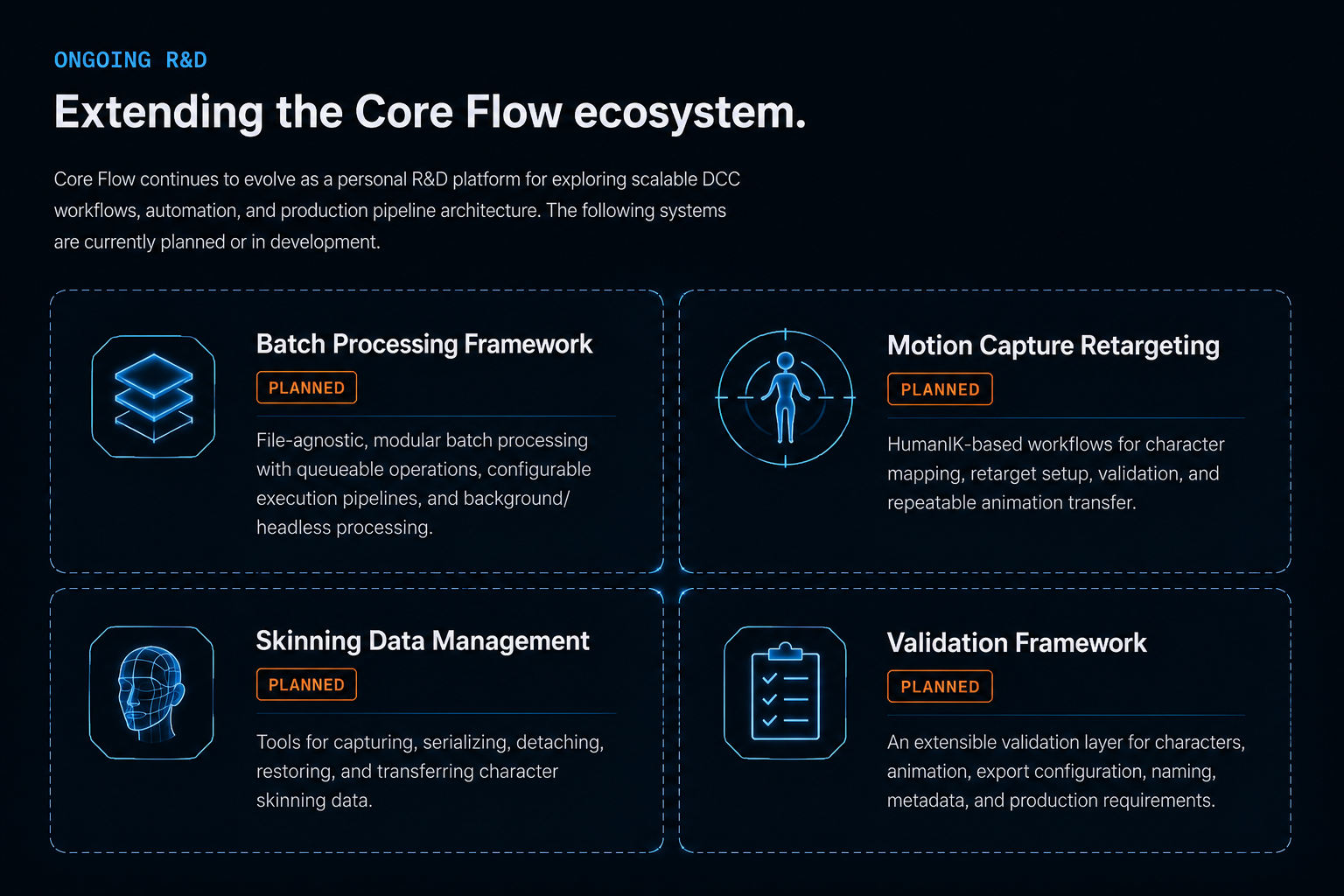
Core Flow Tools is an independent, clean-room R&D project built from scratch to explore modern Maya/DCC pipeline architecture, artist workflows, and AI-assisted production. It remains under active development, with systems and workflows continuously evolving through experimentation and iteration.

CORE FLOW ECOSYSTEM

Built as a system, not a collection of scripts.

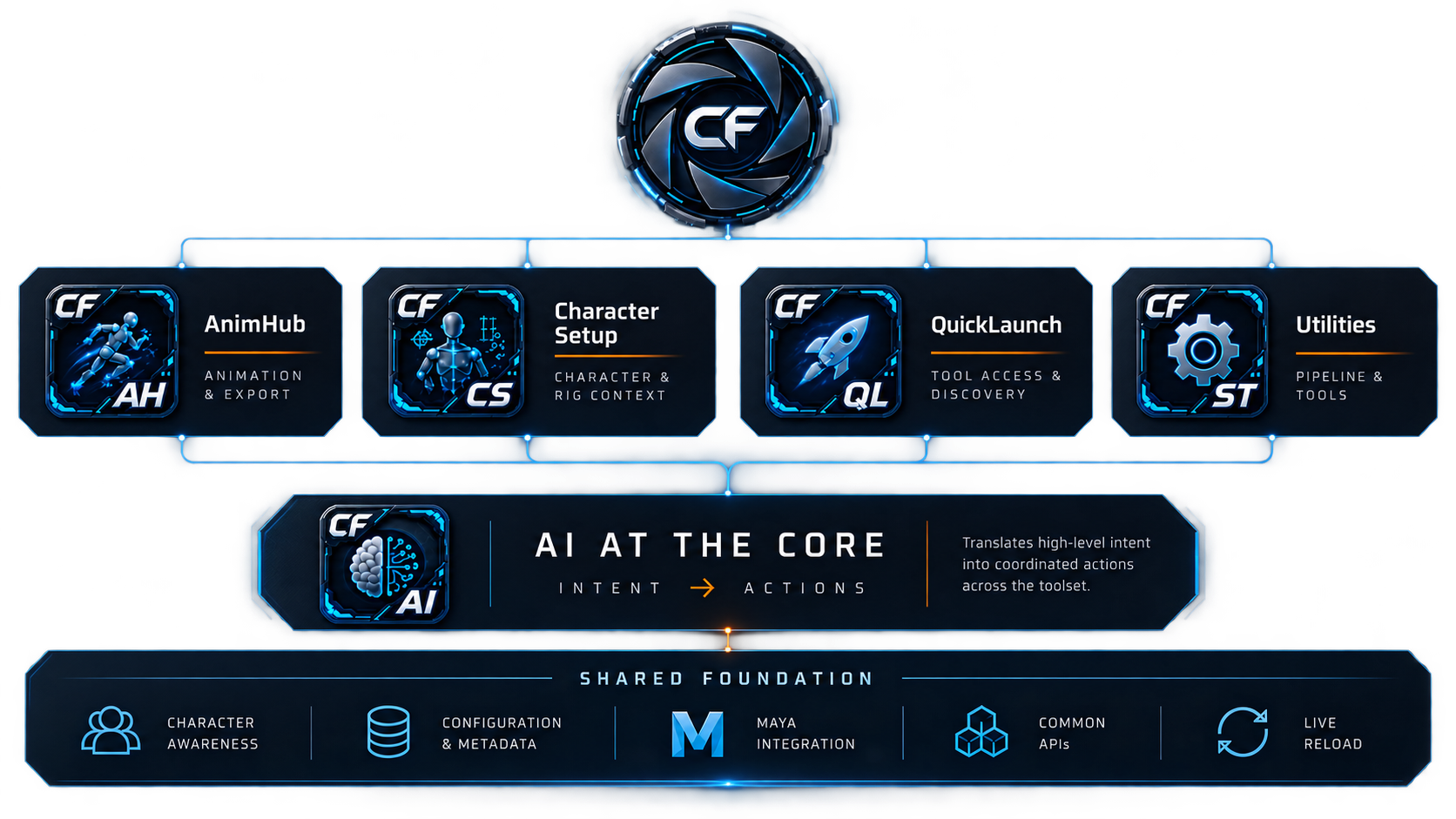
Core Flow Tools is a connected Maya framework where applications share character context, production data, common services, and an AI layer capable of turning artist intent into coordinated actions across the toolset.

AI was designed into Core Flow from the ground up as a shared capability—not added as a layer on top of individual tools. Applications expose curated APIs that give AI controlled access to production workflows, allowing high-level artist intent to coordinate actions across characters, animation, scene data, and pipeline systems while keeping operations reviewable and undoable.

The AI layer is provider-agnostic. A common backend supports multiple AI services and models without tying production tools to a single provider. Core Flow currently supports Anthropic, OpenAI, and Gemini, with additional providers able to integrate through the same architecture.

CF ANIMHUB

A character-aware animation workspace.

Built around visual feedback, intelligent assistance, Maya-native integration, and production-ready animation workflows.

AnimHub brings animation clips, characters, previews, Maya’s Time Editor, Bookmarks, Game Exporter, animation layers, and export configuration into a connected workflow—reducing the friction of managing animation across separate tools and systems.

VISUAL WORKFLOW

Animation you can see.

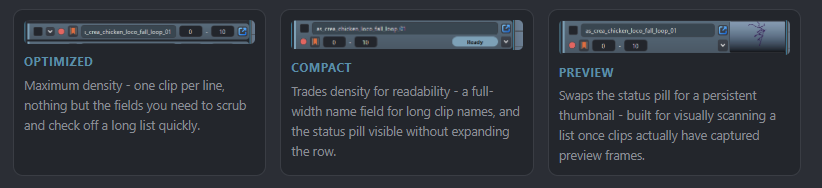
AnimHub turns animation clips into a visual library. Cached animated previews make takes immediately recognizable while supporting hover previews, browsing, comparison, and multiple viewing modes.

Generate once. Preview everywhere.
The same cached preview data is shared across AnimHub’s clip widgets and dedicated Clip Previewer.

AI AT THE CORE

Ask for the workflow, not the command.

AnimHub’s AI Companion translates high-level production intent into reviewable operations using the same character-aware, animation-aware systems available throughout the toolset.

ACTUAL PROMPT

“Insert a 100-frame AnimHub clip at frame 221 named ‘Navigation_Offset_Test’. Offset all subsequent animation clips by 100 frames, and if objects are selected, offset their keyframes by the same amount.”
AI-Assisted Ripple Editing

One request coordinates AnimHub clips, timeline structure, and selected Maya animation.

UNDERSTANDS CONTEXT
Clips, timeline state, selections, Maya keyframes

CROSSES SYSTEMS
One request can coordinate AnimHub and Maya scene data

ARTIST CONTROLLED
Operations remain reviewable and undoable

MAYA-NATIVE INTEGRATION

Connected, not isolated.

Two-Way Time Editor Integration
Animation can move between AnimHub and Maya’s Time Editor while remaining part of the same production workflow.

ANIMHUB → TIME EDITOR
Move production clips into Maya’s nonlinear editing environment.

TIME EDITOR → ANIMHUB
Bring edited animation back into the AnimHub clip workflow.

LAYER AWARE
Preserve animation-layer context while moving between systems.

CHARACTER-AWARE PRODUCTION

The clip knows who it belongs to.

AnimHub treats character participation as part of the animation clip itself, allowing each take to define which characters participate and how they should be exported.

PER-CLIP CHARACTER TARGETING
Define exactly which characters participate in each animation clip.

CHARACTER-SPECIFIC EXPORT
Maintain export configuration independently for each participating character.

MULTI-CHARACTER WORKFLOWS
Manage shared scenes without relying on scene-wide export assumptions.
NATIVE MAYA ECOSYSTEM

Works with the tools artists already know.

AnimHub extends Maya’s existing animation workflows rather than replacing them, keeping production data connected across familiar native tools.

NATIVE BOOKMARK INTEGRATION
Clips remain connected with Maya's native Bookmark workflow.

TWO-WAY SYNC
Changes can move between AnimHub and Maya Bookmarks.

NON-DESTRUCTIVE
Native bookmarks remain independent rather than becominghard dependencies of AnimHub clips.

NATIVE GAME EXPORTER INTEGRATION
AnimHub clips synchronize directly with Maya's Game Exporter.

TWO-WAY SYNC
Clip definitions can move between AnimHub and Game Exporter.

SAFE & REPEATABLE
Name-based matching keeps repeated synchronization predictablewithout creating duplicate entries.

ANIMATOR WORKFLOW

Work directly with the clip.

AnimHub puts common animation actions directly in the clip workspace—reducing navigation and keeping artists focused on the animation.

DIRECT ANIM CLIP INTERACTION

The clip itself becomes a control surface.

CTRL + CLICK
Synchronize active take

CTRL + DRAG
Scrub through the clip range

ALT + CLICK
Playback the animation in Maya's timeline and current viewport

CONSISTENT PREVIEW CLIP INTERACTION

Preview Clips and Remote share the same Playback and Drag Behavior

Switch 'Clip Views' to match your view preference

CLIP REMOTE

Rapid navigation with context. — “Search animation clips, preview matching takes on hover, jump between clips, see the currently active take, and export the current clip directly from the shuttle."

GROUPS

ORGANIZED AT SCALE — “Organize animation clips into logical groups for faster navigation and management.”

PRODUCTION PIPELINE

From animation to export.

AnimHub connects clip management, character context, animation layers, previews, Maya-native workflows, and export configuration into a unified production path.

BEYOND ANIMHUB

One framework. Multiple production workflows.

AnimHub is one expression of the Core Flow architecture. The same shared foundation is designed to support character setup, tool discovery, pipeline utilities, and future production workflows through common context, configuration, APIs, and AI-assisted capabilities.

TECHNICAL DOCUMENTATION

Explore the system behind the tools.

Architecture, APIs, implementation decisions, and technical design documentation for Core Flow Tools.

Explore Technical Documentation →